readbud - get paid to read and rate articles
Profile Facebook Twitter
contact
Google Yahoo
bCOMStudio

Senin, 27 Desember 2010

blog tutorial

blog tutorial


Kategori Otomatis hanya Thumbnail

Posted: 27 Dec 2010 03:38 PM PST

Dalam posting sebelumnya mengenai fitur Kategori Otomatis Dengan Thumbnail ada yang request, bagaimana jika yang tampil adalah hanya thumbnail saja dan berderet ke samping? ini bisa saja di lakukan, namun tentu dengan sedikit modifikasi.

Contoh screenshot dari kategori otomatis hanya menampilkan thumbnail:


kategori otomatis hanya thumbnail


Berikut adalah langkah-langkahnya :


Langkah pertama

  1. Login ke blogger dengan ID anda.
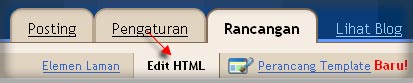
  2. Klik Rancangan.
    rancangan
  3. Klik tab Edit HTML.
  4. Disarankan untuk membuat backup terlebih dahulu, klik pada tulisan Download Template Lengkap.
  5. Carilah kode ]]></b:skin>, copy lalu paste kode berikut persis diatas kode ]]></b:skin>
    /*** Labels Thumbs ***/ img.label_thumb{ float:left; border:1px solid #ccc; width:85px; height:70px; margin-right:10px; margin-bottom:10px; }
  6. Carilah kode </head>, copy lalu paste kode berikut persis diatas kode </head>
    <script type='text/javascript'> //<![CDATA[ function labelthumbs(json){document.write('<div>');for(var i=0;i<numposts;i++){var entry=json.feed.entry[i];var posttitle=entry.title.$t;var posturl;if(i==json.feed.entry.length)break;for(var k=0;k<entry.link.length;k++){if(entry.link[k].rel=='replies'&&entry.link[k].type=='text/html'){var commenttext=entry.link[k].title;var commenturl=entry.link[k].href;} if(entry.link[k].rel=='alternate'){posturl=entry.link[k].href;break;}} var thumburl;try{thumburl=entry.media$thumbnail.url;}catch(error) {s=entry.content.$t;a=s.indexOf("<img");b=s.indexOf("src=\"",a);c=s.indexOf("\"",b+5);d=s.substr(b+5,c-b-5);if((a!=-1)&&(b!=-1)&&(c!=-1)&&(d!="")){thumburl=d;} else thumburl='';} document.write('<a href="'+posturl+'" title="'+posttitle+'"><img class="label_thumb" src="'+thumburl+'"/></a>'); if(i!=(numposts-1)) document.write('');} document.write('</div>');} //]]> </script>
  7. Klik tombol SIMPAN TEMPLATE.
  8. Langkah pertama selesai.

Langkah kedua

  1. Klik tab Rancangan.
    rancangan
  2. Jika masih dalam posisi tab Elemen Laman, silahkan klik terlebih dahulu tab menu Elemen Laman.
    elemen laman
  3. Klik Tambah Gadget untuk menambahkan gadget baru.
    tambah gadget
  4. Setelah muncul jendela baru, klik tanda plus untuk HTML/JavaScript
    html javascript
  5. Copy script dibawah ini, lalu paste pada kolom yang tersedia. Beri juga judul yang sesuai dengan yang anda inginkan. Namun sebelumnya anda harus mengubah tulisan yang di beri warna merah dengan nama kategori yang di inginkan.

    <script type='text/javascript'>var numposts = 6;</script>
    <script type="text/javascript" src="/feeds/posts/default/-/namalabelmu?orderby=updated&alt=json-in-script&callback=labelthumbs"></script>


     script label
  6. Klik tombol SIMPAN
  7. Langkah kedua Selesai.

Jika anda ingin menambahkan widget lain untuk nama kategori yang lain, anda hanya melakukan hal yang sama dengan urutan Langkah Kedua.

Untuk pengaturan custom seperti mengubah ukuran thumbnail, border dan lainnya, anda dapat mengubah pengaturan di bagian CSS, silahkan kreasikan sendiri :


/*** Labels Thumbs ***/
img.label_thumb{
float:left;
border:1px solid #ccc;
width:85px;
height:70px;
margin-right:10px;
margin-bottom:10px;
}


Untuk mengatur jumlah thumbnail yang ingin tampil anda tinggal mengubah angka 6 dengan nilai angka yang lain.


<script type='text/javascript'>var numposts = 6;</script>

Manampilkan kategori hanya thumbnail, mungkin cocok untuk blog yang bersifat gallery template, gallery photo dan sejenisnya.


read more...

Sabtu, 25 Desember 2010

Skincorner

Skincorner


The importance of Business Card

Posted: 25 Dec 2010 10:37 AM PST

Business cards are usually the first thing that new business owners get printed out. This is very important for business owner to make this card looks professional because business card is an effective marketing tool. Business card is the first impression you give to a potential customer or client. You will be able to gain many customers with the help of this card.
Design the business card, booklets and brochures for your business is very important. The designs must be looks professional and describe your product or service well. There are so many options to print the marketing and advertising tools. You will come across various options. If you interested to use online printing service maybe you need to try PrintPlace.com.
They are one of the best online printing companies who provide high quality, full color offset printing and direct mail services at guaranteed low prices. You can get all your printing needs like booklets, business card, or brochures only from your home. They can designs and developing your need and providing high quality printing stuff with automated ordering system with end-to-end manufacturing and shipping integration.
If you want to use their service, don't forget to find printplace.com discount. The coupon can be found online on many website. You can get special promotion by using the coupon code. Maybe you can save 5% or get free shipping for your purchase.

read more...

Kamis, 23 Desember 2010

blog tutorial

blog tutorial


fitur Kategori Otomatis Dengan Thumbnail

Posted: 23 Dec 2010 12:07 AM PST

Fitur kategori otomatis dengan thumbnail sebenarnya merupakan pengembangan dari trik sebelumnya mengenai Menampilkan Kategori Berdasarkan Nama Label, fitur ini bisa menampillkan kategori berdasarkan nama kategori beserta gambar thumbnail dengan ringkasan artikel.

Contoh penerapan dari fitur kategori otomatis dengan thumbnail bisa anda lihat demonya pada Fresh Revolution Template:

Live Demo

featured kategori

Kategori atau label yang diinginkan akan tampil secara otomatis tanpa anda harus mengeditnya setiap saat.

Apa yang harus dipersiapkan? yang harus anda persiapkan hanyalah nama kategori yang ingin di tampilkan. Namun perlu diketahui bahwa nama label ini bersifat case-sensitive artinya nama yang di pasang hurufnya harus sama persis dengan label di blog anda, misal nama kategori Kesehatan berbeda dengan kesehatan oleh karenanya pastikan terlebih dahulu bahwa nama label sama persis hurufnya.

Cara yang mudah untuk melihat nama label secara tepat adalah coba tampilkan terlebih dahulu widget label di blog anda, kemudian sorot nama label yang diinginkan kemudian lihat pada statusbar browser internet anda.

label name


Terlihat bahwa label Featured, nama label sebenarnya adalah featured (huruf kecil semua), ini terjadi karena tampilan di blog di pengaruhi oleh setting CSS. Dalam hal ini, yang diperlukan adalah nama label asli.

Berikut adalah langkah-langkah untuk membuat fitur kategori otomatis dengan thumbnail.


Langkah pertama

  1. Login ke blogger dengan ID anda.
  2. Klik Rancangan.
    rancangan
  3. Klik tab Edit HTML.
  4. Disarankan untuk membuat backup terlebih dahulu, klik pada tulisan Download Template Lengkap.
  5. Carilah kode ]]></b:skin>, copy lalu paste kode berikut persis diatas kode ]]></b:skin>


    /*** Featured Categories ***/      img.label_thumb{         float:left; 	padding:5px; 	border:1px solid #8f8f8f; 	background:#D2D0D0; 	margin-right:10px; 	height:55px; 	width:55px; 	}      img.label_thumb:hover{ 	background:#f7f6f6; 	}      .label_with_thumbs { 	float: left; 	width: 100%; 	min-height: 70px; 	margin: 0px 10px 2px 0px; 	adding: 0; 	}      ul.label_with_thumbs li { 	padding:8px 0; 	min-height:65px; 	margin-bottom:10px; 	}     .label_with_thumbs a {}     .label_with_thumbs strong {}
  6. Carilah kode </head>, copy lalu paste kode berikut persis diatas kode </head>
    <script type='text/javascript'> //<![CDATA[ function labelthumbs(json){document.write('<ul class="label_with_thumbs">');for(var i=0;i<numposts;i++){var entry=json.feed.entry[i];var posttitle=entry.title.$t;var posturl;if(i==json.feed.entry.length)break;for(var k=0;k<entry.link.length;k++){if(entry.link[k].rel=='replies'&&entry.link[k].type=='text/html'){var commenttext=entry.link[k].title;var commenturl=entry.link[k].href;} if(entry.link[k].rel=='alternate'){posturl=entry.link[k].href;break;}}var thumburl;try{thumburl=entry.media$thumbnail.url;}catch(error) {s=entry.content.$t;a=s.indexOf("<img");b=s.indexOf("src=\"",a);c=s.indexOf("\"",b+5);d=s.substr(b+5,c-b-5);if((a!=-1)&&(b!=-1)&&(c!=-1)&&(d!="")){thumburl=d;}else thumburl='https://blogger.googleusercontent.com/img/b/R29vZ2xl/AVvXsEjVmWH7FFMDqUMTdNVOPIXqo6CmuSb7KeX894Zil_g6DfeIsOH0f8EvOMEZmRKXuws2oeNJSjeJrDvVJQDLR1b_13QaWBhOsI16cy_MBvkwSfISGi5M28Ncb5hK-JIG2Kt5mq4RUyCbZ-K2/';} var postdate=entry.published.$t;var cdyear=postdate.substring(0,4);var cdmonth=postdate.substring(5,7);var cdday=postdate.substring(8,10);var monthnames=new Array();monthnames[1]="Jan";monthnames[2]="Feb";monthnames[3]="Mar";monthnames[4]="Apr";monthnames[5]="May";monthnames[6]="Jun";monthnames[7]="Jul";monthnames[8]="Aug";monthnames[9]="Sep";monthnames[10]="Oct";monthnames[11]="Nov";monthnames[12]="Dec";document.write('<li class="clearfix">');if(showpostthumbnails==true) document.write('<a href="'+posturl+'" target ="_top"><img class="label_thumb" src="'+thumburl+'"/></a>');document.write('<strong><a href="'+posturl+'" target ="_top">'+posttitle+'</a></strong><br>');if("content"in entry){var postcontent=entry.content.$t;} else if("summary"in entry){var postcontent=entry.summary.$t;} else var postcontent="";var re=/<\S[^>]*>/g;postcontent=postcontent.replace(re,"");if(showpostsummary==true){if(postcontent.length<numchars){document.write('');document.write(postcontent);document.write('');} else{document.write('');postcontent=postcontent.substring(0,numchars);var quoteEnd=postcontent.lastIndexOf(" ");postcontent=postcontent.substring(0,quoteEnd);document.write(postcontent+'...');document.write('');}} var towrite='';var flag=0;document.write('<br>');if(showpostdate==true){towrite=towrite+monthnames[parseInt(cdmonth,10)]+'-'+cdday+' - '+cdyear;flag=1;} if(showcommentnum==true) {if(flag==1){towrite=towrite+' | ';} if(commenttext=='1 Comments')commenttext='1 Comment';if(commenttext=='0 Comments')commenttext='No Comments';commenttext='<a href="'+commenturl+'" target ="_top">'+commenttext+'</a>';towrite=towrite+commenttext;flag=1;;} if(displaymore==true) {if(flag==1)towrite=towrite+' | ';towrite=towrite+'<a href="'+posturl+'" class="url" target ="_top">More »</a>';flag=1;;} document.write(towrite);document.write('</li>');if(displayseparator==true) if(i!=(numposts-1)) document.write('');}document.write('</ul>');} //]]> </script>
  7. Klik tombol SIMPAN TEMPLATE.
  8. Langkah pertama selesai.

Langkah kedua

  1. Klik tab Rancangan.
    rancangan
  2. Jika masih dalam posisi tab Elemen Laman, silahkan klik terlebih dahulu tab menu Elemen Laman.
    elemen laman
  3. Klik Tambah Gadget untuk menambahkan gadget baru.
    tambah gadget
  4. Setelah muncul jendela baru, klik tanda plus untuk HTML/JavaScript
    html javascript 
  5. Copy script dibawah ini, lalu paste pada kolom yang tersedia. Beri juga judul yang sesuai dengan yang anda inginkan. Namun sebelumnya anda harus mengubah tulisan yang di beri warna merah dengan nama kategori yang di inginkan.

    <script type='text/javascript'>var numposts = 3;var showpostthumbnails = true;var displaymore = false;var displayseparator = false;var showcommentnum = false;var showpostdate = false;var showpostsummary = true;var numchars = 80;</script>

    <script type="text/javascript" src="/feeds/posts/default/-/Gadget?orderby=updated&alt=json-in-script&callback=labelthumbs"></script>

    gadget corner 
  6. Klik tombol SIMPAN
  7. Langkah kedua Selesai.

Jika anda ingin menambahkan widget lain untuk nama kategori yang lain, anda hanya melakukan hal yang sama dengan langkah-langkah diatas.

Apakah script diatas bisa di customisasi? bisa. Dalam kode diatas ada bebebrapa yang dapat anda atur misal jumlah karakter yang ingin di tampilkan, thumbnail, jumlah posting, tanggal posting, komentar, serta more link.

Dalam script tersebut ada tulisan severti ini :

var numposts = 3;
var showpostthumbnails = true;
var displaymore = false;
var showcommentnum = false;
var showpostdate = false;
var showpostsummary = true;
var numchars = 80;

Kode berwarna merah adalah kode yang bisa anda edit, true berarti tampilkan, false berarti jangan di tampilkan, 80 adalah jumlah karakter, silahkan coba-coba ganti saja.


Cobain deh, pasti asik !!!


Inspirated by : Featured posts widget with Thumbnails using Labels


read more...

Selasa, 21 Desember 2010

Skincorner

Skincorner


Choose Top Web Hosting

Posted: 21 Dec 2010 09:03 AM PST

Guys, if you now find a web hosting service, you can search all the information about web hosting service on AlreadyHosting.com. This site provides web hosting reviews, ratings, coupon codes, articles, and many information about the web hosting providers. You must choose the web hosting service based for your need. Read the reviews from the users and choose carefully and wisely.
I always read the Web Hosting Reviews from this site, especially to know the new information about who are the Top 10 hosts offer cheap web hosting with good reviews from the independent user. With their information, you can get a good web hosting with affordable price and save your money. By visiting this site you also can get the news, articles, web hosting comparison and web hosting coupon.
One of an interesting promo that you can read on this site is Bluehost $3.95. BlueHost is ranked 2 on their list of top 10 web hosting providers and have 97% ratings. BlueHost.com offers unlimited bandwidth, unlimited disk space, unlimited domain hosting, and a free domain for only $3.95/month!
This professional web hosting also offers no hidden fees, free instant set-up and they guarantee anytime money back guarantee. So, if you now search a new web hosting or plan to moving to a new one, check this Bluehost $3.95 promo.

Choose Web Hosting For your Online Business

Posted: 20 Dec 2010 09:03 PM PST

If you now interested to run internet businesses, considering a good web hosting is very important. So, you must choose the web hosting wisely before purchase it. Don’t only choose based on the cheap price. Cheap price is not always the best choice. A cheap web hosting maybe can make you save a few of dollar, but end up with losing hundreds from your online business in a month. When I was first made my online business, I choose a cheap web hosting. When I purchase it, I’m only considered the cheap price. But, I am made a big mistake because my online store always down all the time. You would not want your website to be down during peak business hours, right? That also makes my online store looks not professional. The problems can make worse if when your site down, you can call your web hosting’s customer service. So, before you get excited and setting up your website, pick out a good web hosting company first with the reasonable price. The number of web hosting service providers is very increasing right now, and of course makes more difficult to choose from such a wide range of providers of these services. You can search information about web hosting reviews and rating first. Use the reviews from independent reviews and compare the price. Don't forget to search the rating. Some site provides top rated web hosting service based from the user's rate. Read Believe me, you want to choose a good web hosting than a cheap web hosting. If you thinking it will be easy to move your site from one hosting to another hosting, you are completely wrong. Because moving into a new web host is very annoying and make you lose your time and data. And sometimes it also makes your site down a few days.

read more...

Senin, 20 Desember 2010

blog tutorial

blog tutorial


Menampilkan Kategori Berdasarkan Nama Label

Posted: 20 Dec 2010 04:30 PM PST

Umumnya untuk menammpilkan kategori atau label, yang ditampilkan adalah semua nama kategori atau labelnya. Lalu, adakah cara untuk untuk menampilkan kategori atau label berdasarkan nama kategori atau label? jawabannya ada.

Menampilkan kategori berdasarkan nama label dirasa lebih menarik karena lebih spesifik, misal blog anda mempunyai kategori : ekonomi, politik, entertainment dan lain sebagainya.

Langkah awal yang harus anda persiapkan yaitu kategori apa yang mau anda tampilkan, lalu catat atau copy paste nama kategori atau label tersebut, misal politik. Untuk nama kategori yang mempunyai spasi kosong, harus di ganti dengan %20 , misal untuk kategori blogger tutorial, nama kategori tersebut diganti menjadi :

blogger%20tutorial

Hal lain yang harus anda ketahui adalah, nama label ini bersifat case-sensitive atau peka terhadap hurup besar (huruf kapital) atau kecil, misal kategori blogger%20tutorial berbeda dengan Blogger%20tutorial.

Langkah kedua adalah menyiapkan alamat feed untuk nama kategori  yang anda inginkan, format dasarnya seperti berikut :


http://alamat_blog_anda/feeds/posts/default/-/nama_label


Misal blog kang Rohman alamat blognya adalah http://kolom-tutorial.blogspot.com dan nama label yang mau di tampilkan adalah blogger%20tutorial maka alamat feed yang dipersiapkan adalah :

http://kolom-tutorial.blogspot.com/feeds/posts/default/-/blogger%20tutorial


Dan berikut adalah cara menampilkan kategori berdasarkan nama label di blogger :


  1. Login ke blogger dengan ID anda.
  2. Klik Rancangan.
    rancangan di blogger
  3. Klik tab Elemen Laman jika anda belum pada posisi tab ini.
    elemen laman blogger
  4. Klik salah satu link Tambah Gadget.
    tambah gadget
  5. Akan keluar window baru, klik tanda plus ( + ) untuk Feed.
    feed gadget
  6. Masukkan alamat feed yang telah anda persiapkan sebelumnya. Sebagai contoh, coba masukkan alamat berikut ;

    http://kolom-tutorial.blogspot.com/feeds/posts/default/-/blogger%20tutorial

    masukan alamat feed
  7. Akan muncul Opsi, disini anda dapat mengganti judul, berapa posting yang mau di tampilkan (maksimal 5 post) dan lain sebagainya.
    setting feed gadget
  8. Klik tombol SIMPAN.
  9. Selesai.

Untuk menampilkan nama kategori yang lain, anda tinggal mengulang kembali langkah diatas, tentunya dengan alamat feed yang berbeda sesuai dengan nama kategori yang anda inginkan.
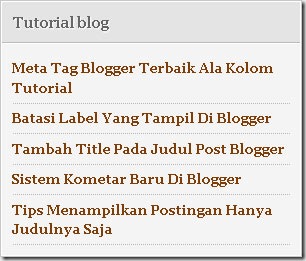
tutorial blogger

Ada variasi lain yang bisa anda dapatkan dari teknik diatas, yakni pengurutan tampilan bisa berdasarkan posting yang terupdate:


http://alamat_blog_anda/feeds/posts/default/-/nama_label?orderby=updated


Meskipun posting yang telah lama, namun jika di update kembali, maka akan muncul didereratn paling atas.


Jika anda merasa kurang puas dengan teknik diatas, maka ada teknik lain yang sepertinya lebih menarik yakni menampilkan kategori berdasarkan nama kategori disertai thumbnail dan ringkasan artikel seperti yang ada pada Fresh Revolution Template. Simak tutorialnya pada posting yang akan datang.


read more...

Jumat, 17 Desember 2010

Skincorner

Skincorner


The Easy Way to Get a Mortgage

Posted: 17 Dec 2010 05:49 AM PST

Many people today experience difficulties when it comes to finding mortgages. Subprime mortgages make lenders become more careful to select buyers. They only choose the most qualified buyers to qualify to refinance or for a Mortgage. Lenders are changing their guidelines day by day to make them more restrictive to secure their private financial security. It becomes harder for people to get loans when lenders set high standard guidelines. You don’t have to worry if you have low credit score or maybe lack in assets department. Your weakness in one particular area doesn’t close your chance to get loan in a whole. You can make up another area to cover your weakness. To get approval for your loan at least you need such these things like solid credit score, big down payment, and get right on your paperwork. Today there are no mortgage insurance providers which cover 100% financed loans or 95% of buyers with low credit scores. Forget about giving down payment of 5% or 10% only. Most mortgage firms need down payments of 20% or more and also bank statements confirming assets that you will use to cover your mortgage payments up to next six months. If you have low credit score and lack of assets, you’d better pay higher for your down payment and get your paperwork right. These ways help increasing your bargaining position in market to get loan that you need.

read more...

face2face - Facebook Chat!